Toolbox overview
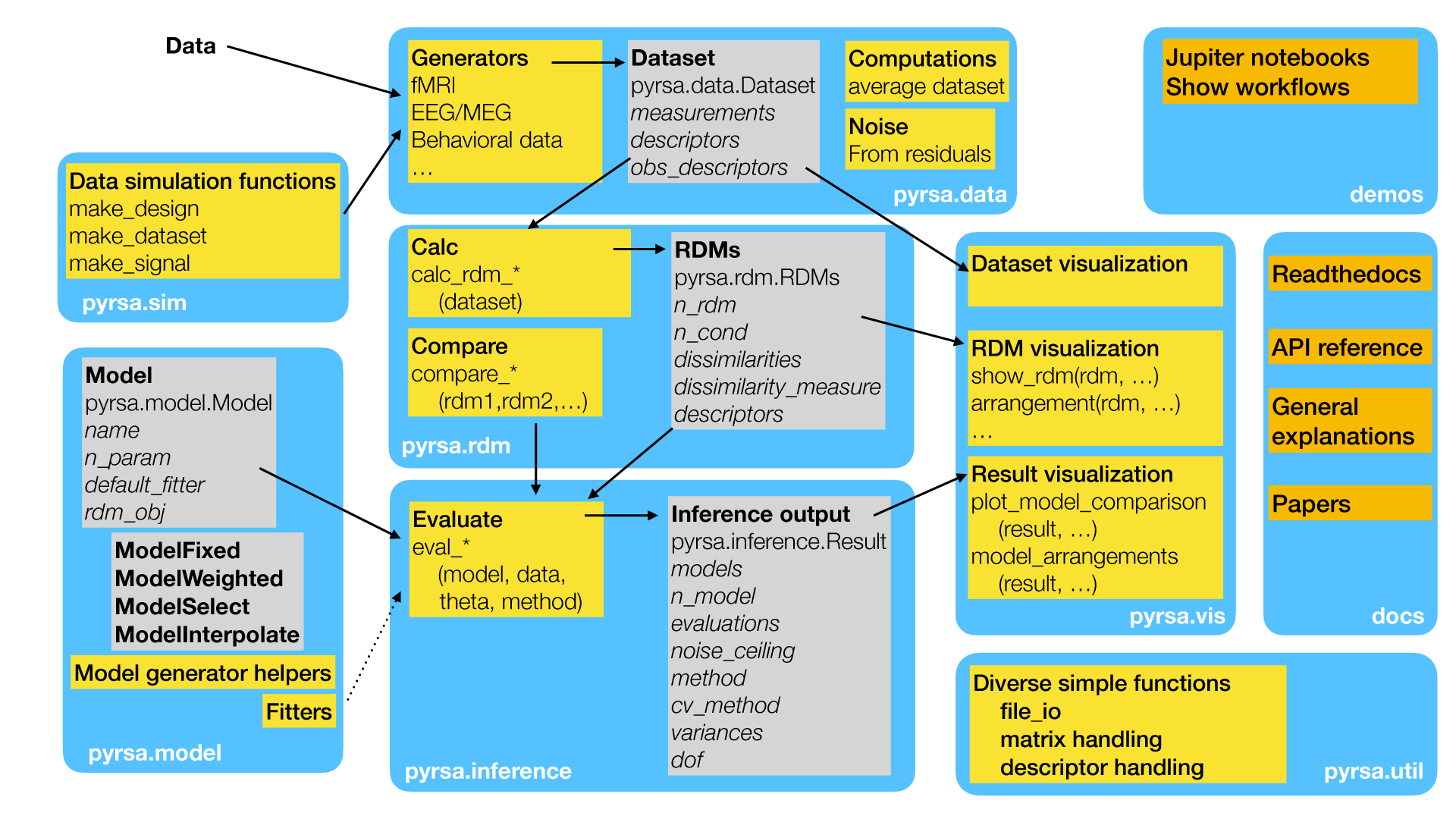
Overview over subpackages and work flow in rsatoolbox.
The Figure above shows the most important subpackages (blue), classes (gray), modules (yellow) and auxillary materials (orange) of the RSA toolbox. A common use of the RSA toolbox involves the following steps:
Extract the data that you want to analyzed. The data is stored in the format of a
rsatoolbox.data.Datasetobject, see Defining the data set.Use functions from the module
rsatoolbox.rdm.calcto calculate a RDM from the data, with many options for different dissimilarity measures, see Estimating dissimilarities.Define RSA models by defining objects of the
rsatoolbox.modelclass. For information on the different model types, see Model Specification.Models can be fitted to the data and then evaluated using the
rsatoolbox.inference.evaluatemodule. Results of the evaluation is stored in arsatoolbox.inference.resultsobject.Dataset, RDMs, Models, and results can be visualized using the
rsatoolbox.vissubpackage.For simulation of artificial data sets, you can used the
rsatoolbox.sim.simulationmodule.
For an example of a complete workflow, see the “getting started with RSAtoolbox” Notebook, Demos.